Lion Portal-Ready Reporting
Service Reporting

Accurate Service Reporting Starts at the Front End

Most Lions Clubs struggle with reporting because data is collected inconsistently, then entered into Lion Portal manually after the fact — often weeks later, often wrong. This system solves that problem at the source. By building structured data collection directly into the event and service workflow, the back-end reporting your club is legally required to submit becomes a natural byproduct of what you're already doing.

Top 3 HoursServed benefits

Three workflows that give officers more time to serve

01

One-click attendance notification — no login required

Send attendance requests by email and let members respond Yes or No from any device without downloading an app or remembering a password.

  • Notify the full roster in seconds
  • Record attendance and service hours from one response
  • Keep a timestamped officer-ready record
02

Meetings and events drafted with Google Calendar download and sync

Import upcoming Google Calendar events into HoursServed as drafts, review them before activation, and give attendees a one-click Add to Google Calendar option.

  • Import upcoming Google Calendar events as drafts
  • Review duration and commute time before activation
  • Let members add confirmed events to Google Calendar
03

Automated Lion Portal uploads (available with LCI approval)

Automated Lion Portal uploads are coming soon, subject to written approval from Lions Clubs International

  • Capture Lion Portal-aligned fields during normal event entry
  • Route monthly activity reports for officer review and approval
  • Download CSV and PDF reports now; activate protected uploads only after approval
Available with LCI approval

Officer-reviewed reporting

Prepare accurate Lion Portal activity reports now

Automated Lion Portal uploads are coming soon, subject to written approval from Lions Clubs International. Until approval is received, HoursServed keeps the officer review workflow in place and provides CSV and PDF reports for manual submission.

1

Capture aligned event information

HoursServed collects the activity, attendance, service-hour, and venue details needed for Lion Portal-ready reporting.

2

Review and approve the monthly report

A designated officer checks the report before it is finalized, distributed, or prepared for submission.

3

Download CSV or PDF

Use the officer-approved downloadable report for manual Lion Portal activity reporting today.

Automated uploads stay protected until approval. Existing CSV downloads, PDF reports, event data, and officer approval workflows remain available.

Aligned data collection

Collect Lion Portal-ready fields during normal event and meeting workflows.

Officer review first

A named officer reviews and approves each monthly report before distribution.

Downloads available now

Generate CSV and PDF reports for the current manual submission workflow.

Approval-dependent automation

Protected automated uploads can be activated only after written approval from Lions Clubs International.

The Core Principle

Garbage In, Garbage Out — Until Now

The core principle behind this platform is simple: if you capture clean, structured data when a service activity happens, your reporting writes itself.

Defaults eliminate repetitive entry

Default Entries

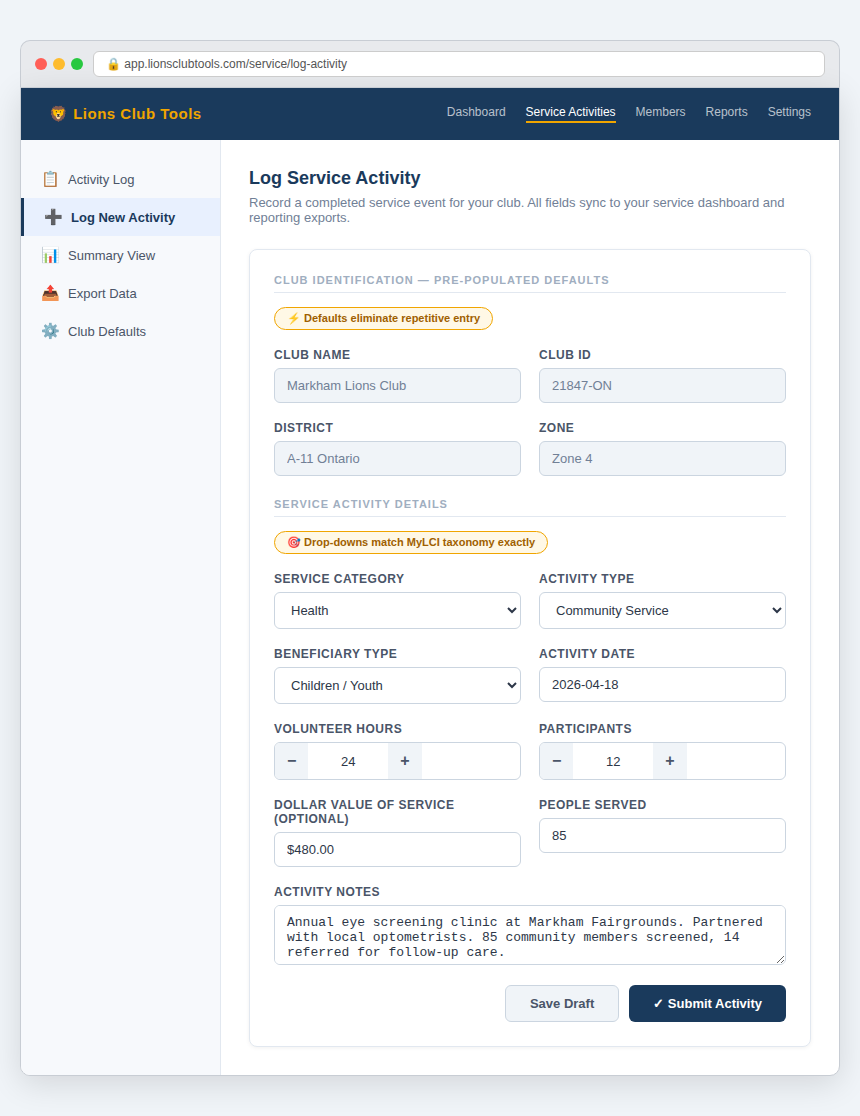
Common values — club ID, district, zone, service category — are pre-populated so volunteers aren't re-typing the same information every time.

Matches Lion Portal categories exactly

Drop-Down Field Selections

Service categories, beneficiary types, and activity types match the exact taxonomy used in Lion Portal — so there's no translation layer or guesswork when it's time to report.

Errors caught at the source

Validated Inputs

Hours, participants, and dollar values are range-checked at entry, catching errors before they become reporting problems.

The result: when your District Governor or secretary sits down to compile quarterly or annual service reports, the data is already clean, categorized, and ready to export.

Service Activity Entry Form showing pre-populated club defaults and Lion Portal-matched drop-downs

Aggregated Data, Always Ready

Your Service Dashboard — Real-Time, Every Entry

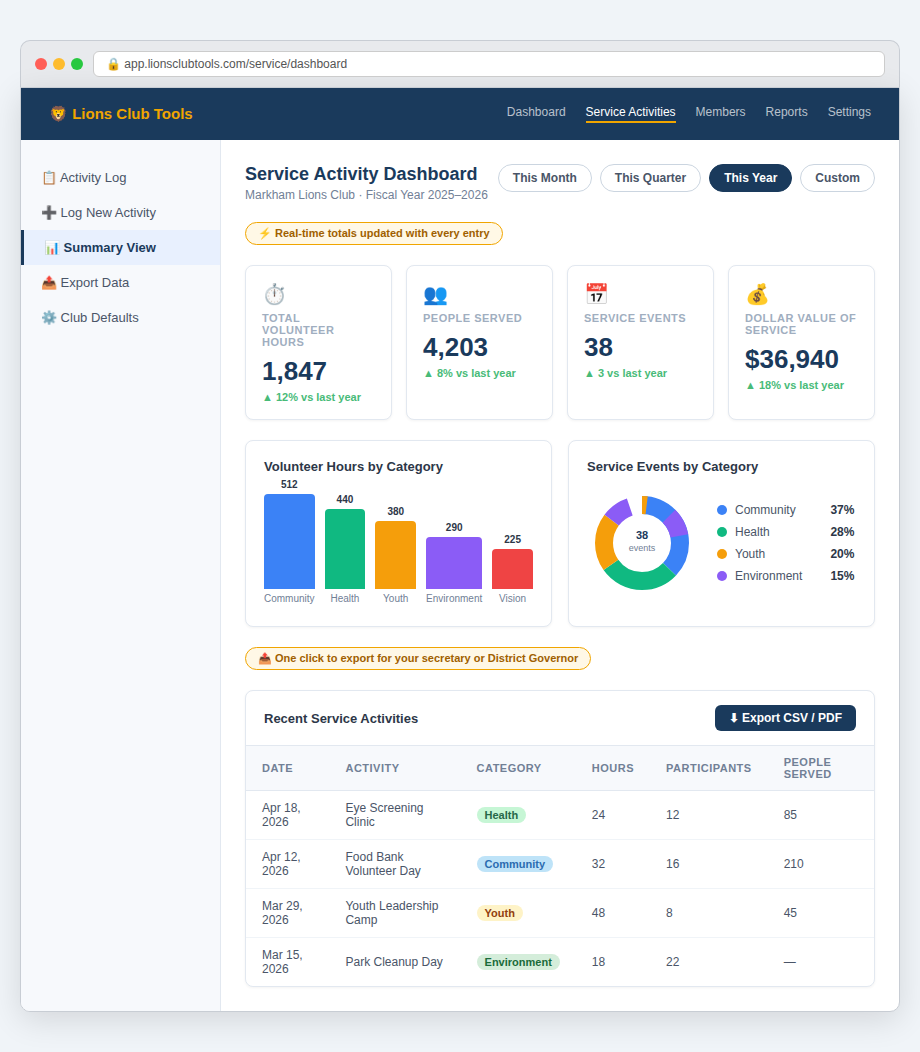
Every service activity logged updates your dashboard instantly. Total hours, people served, events by category — all in one view, filterable by month, quarter, or year.

Service Activity Dashboard showing total hours, people served, and category breakdown charts
Real-time totals updated with every entry

Real-Time Totals

Total volunteer hours, people served, service events, and dollar value of service — updated with every entry, no manual tallying.

Visual Category Breakdown

Bar and donut charts break down volunteer hours and service events by category — Community, Health, Youth, Environment, Vision — so you can see where your club is making impact.

Flexible Date Filtering

Filter by This Month, This Quarter, This Year, or a custom date range. Perfect for quarterly reviews and annual reporting.

One click to export for your secretary or DG

One-Click Export

Export your service summary as CSV or PDF — ready for your secretary, District Governor, or compliance filing.

Legal Obligation

Service Reporting Isn't Optional — It's a Legal Obligation

For Lions Clubs in both the United States and Canada, service activity reporting is directly tied to your tax-exempt status.

United States — IRS Requirements

Lions Clubs in the U.S. are organized as 501(c)(4) social welfare organizations. While they are not required to pay federal income tax, they must file annually with the IRS:

  • Form 990 (or 990-EZ) — requires documented reporting of program service accomplishments, number of people served, and outcomes achieved
  • Failure to file for three consecutive years results in automatic revocation of tax-exempt status under the Pension Protection Act of 2006
  • Revoked status means the club becomes liable for federal income tax and loses its ability to accept tax-deductible donations

Canada — CRA Requirements

Canadian Lions Clubs registered as NPOs file a T1044 annually. Those registered as charitable organizations file a T3010 Registered Charity Information Return, which requires:

  • A detailed account of charitable activities carried out
  • Number of people served and geographic reach
  • Volunteer hours contributed
  • Failure to file can result in revocation of charitable status — meaning donors can no longer claim tax deductions

The Bottom Line

Whether you're filing in the U.S. or Canada, your service activity data is the evidentiary backbone of your compliance. This platform ensures that data exists, is accurate, and is ready when you need it.

Reporting

Three Reporting Features That Matter

Service Summary shows your club's impact at a glance. Lion Portal Upload generates the CSV your District Governor needs. Archive preserves every month's final record.

Service Summary

Total hours, people served, and category breakdown — updated in real time as activities are logged.

Lion Portal Upload

One-click CSV export formatted exactly for Lion Portal submission — no reformatting required.

Archive

Lock and preserve monthly reports with a timestamped audit trail for compliance and historical records.

Mobile-First Design

Capture Hours at the Event — Not Back at the Office

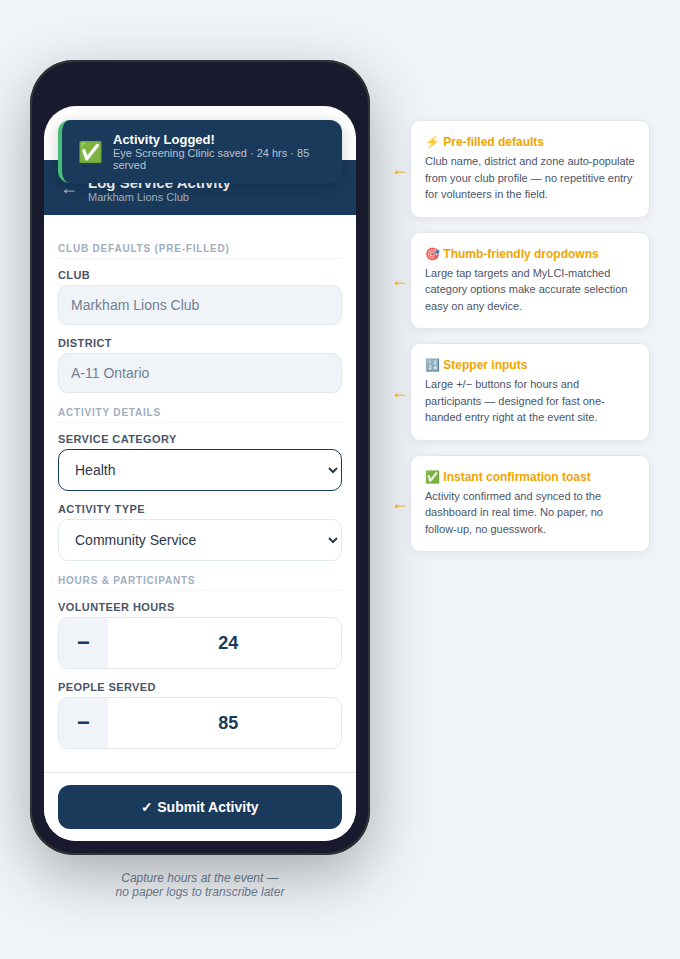
Volunteers can log service hours directly from their phone while the event is happening. No paper logs to transcribe later. No details forgotten by the time someone gets to a desk.

Pre-filled defaults

Club name, district, and zone auto-populate from your club profile — no repetitive entry for volunteers in the field.

Thumb-friendly dropdowns

Large tap targets and Lion Portal-matched category options make accurate selection easy on any device.

Stepper inputs

Large +/− buttons for hours and participants — designed for fast one-handed entry right at the event site.

Instant confirmation toast

Activity confirmed and synced to the dashboard in real time. No paper, no follow-up, no guesswork.

Mobile service entry form showing thumb-friendly inputs and instant confirmation toast

End-to-End

From Service Activity to Submitted Report — In One System

Every step from logging a service event to submitting your compliance report happens inside one connected workflow — no spreadsheets, no copy-paste, no manual re-entry.

1

Event Logged

Officer or volunteer logs the service activity with structured fields

2

Hours Recorded

Service hours and participants captured with validated, categorized inputs

3

Data Aggregated

Dashboard totals update in real time by service category

4

Export Ready

CSV or PDF export generated for Lion Portal submission

5

Report Confirmed

Secretary reviews, confirms, and your compliance record is complete

Common Questions

Frequently Asked Questions

Ready to Make Your Reporting Effortless?

See how HoursServed turns every service activity into clean, compliant reporting data — automatically.