How HoursServed works

For officers
who take their role seriously.

Club secretaries, presidents, and district governors have real work to do — coaching clubs, closing months, meeting Lions Clubs International reporting standards. HoursServed makes sure the administration keeps pace with the leadership.

Top 3 HoursServed benefits

Three workflows that give officers more time to serve

01

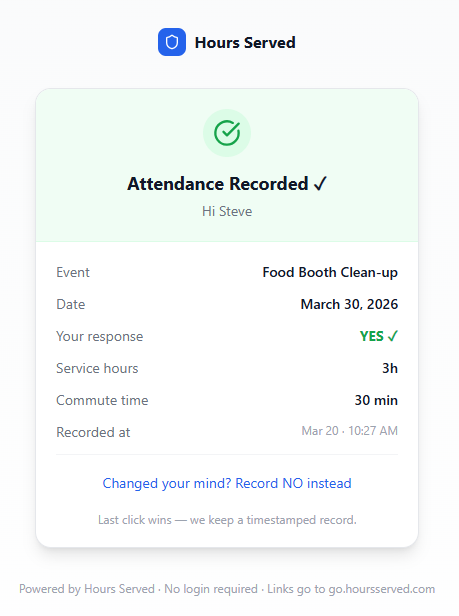
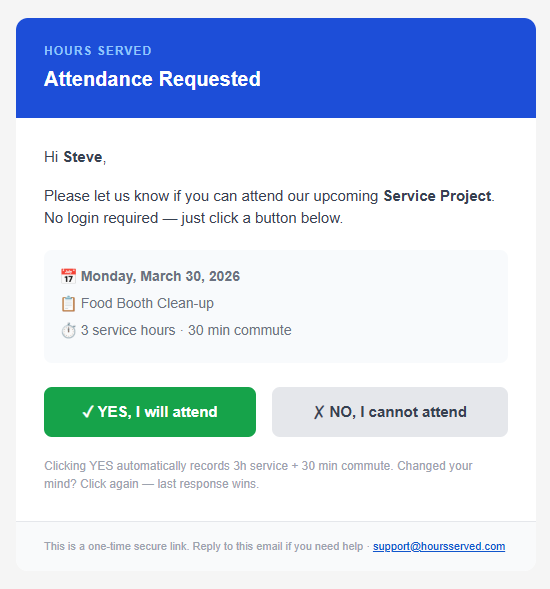
One-click attendance notification — no login required

Send attendance requests by email and let members respond Yes or No from any device without downloading an app or remembering a password.

  • Notify the full roster in seconds
  • Record attendance and service hours from one response
  • Keep a timestamped officer-ready record
02

Meetings and events drafted with Google Calendar download and sync

Import upcoming Google Calendar events into HoursServed as drafts, review them before activation, and give attendees a one-click Add to Google Calendar option.

  • Import upcoming Google Calendar events as drafts
  • Review duration and commute time before activation
  • Let members add confirmed events to Google Calendar
03

Automated Lion Portal uploads (available with LCI approval)

Automated Lion Portal uploads are coming soon, subject to written approval from Lions Clubs International

  • Capture Lion Portal-aligned fields during normal event entry
  • Route monthly activity reports for officer review and approval
  • Download CSV and PDF reports now; activate protected uploads only after approval

District visibility

The visibility to coach.
The records to report.

District governors and secretaries get a live view across every club — reporting coverage, open corrections, event activity, and Lion Portal readiness — without touching data inside any club.

Coverage tracking

Every club, one view

See which clubs are complete, in progress, or overdue — before month-end arrives.

Corrections visibility

Open issues, sorted by severity

Know which clubs need a call — and what to talk about when you make it.

Export readiness

No month-end surprises

See which clubs are Lion Portal–ready and what's blocking the rest.

Read-only access

Oversight without interference

District officers see everything they need. They can't edit data inside any club.

Club-level features

Meeting RSVPs

One email. Two buttons. Attendance handled.

Create a meeting, send invitations in one click, and every member receives a personal email with a Yes or No button. No passwords, no app downloads. Responses update your attendance record in real time.

1

Create the event — name, date, location, and an optional note to members.

2

Send invitations with one click. Every active member gets a personalized email.

3

Members tap Yes or No directly in the email. No account, no app required.

4

Dashboard updates instantly — who's coming, who declined, who hasn't replied.

Members never create a password or download anything. Every action happens inside the email they already received.

Service hours

Collecting hours without chasing people.

Members submit hours through a simple form. You review and approve. HoursServed compiles everything — no spreadsheets, no data entry at month-end.

1

Members submit hours via a shared link. No login required.

2

Review submissions in the Work Queue. Approve or flag for correction.

3

Approved hours lock by month — no accidental overwrites when the secretary changes.

4

Reports compile automatically from approved data, ready for your district or board.

Monthly reports

Reports that generate themselves, then lock.

At month-end HoursServed assembles the report from approved data — attendance, hours, member activity. Officers review by email, approve, and the month locks permanently. Records stay intact regardless of who takes over next year.

1

Auto-generation runs on the last day of the month from all approved submissions.

2

Officers receive the report by email and approve or request corrections — no login needed.

3

Month locks on approval. Data is permanent and auditable regardless of future officer changes.

4

Export in one click — formatted for Lion Portal or your district system.

Volunteer shifts

Shift sign-ups without the group-chat chaos.

Create time slots for your events, share a link, and members claim shifts directly — no spreadsheet, no reply-all. Hours from completed shifts flow into the service record automatically.

1

Define shifts — time, role, and capacity for each slot.

2

Share the sign-up link by email or newsletter. No login required to claim a slot.

3

Members claim a shift and receive instant email confirmation.

4

Hours post automatically after the shift — nothing to enter manually.

Officer transition

New secretary. Zero lost history.

When your executive turns over, no data migrates, no spreadsheets get emailed, and nothing lives on someone's laptop. The incoming officer logs in and the full record is already there.

1

Invite the incoming officer by email — access granted instantly, no IT required.

2

Full history is immediately visible — every locked month, approved report, and member record.

3

Remove the outgoing officer and their access expires. Nothing leaves with them.

4

Role-based access — secretary, president, and district officers each see what's appropriate to their role.

Officer transitions typically take 4–6 hours. With HoursServed, about 10 minutes.

Community volunteers

Open your events to the community, not just your members.

External volunteers sign up for shifts without being club members. Their contributions are tracked separately — they show up in your event record without affecting your Lion Portal member reporting.

1

Enable public sign-ups for any shift. External volunteers get a separate flow from members.

2

Share a public link — post it in community groups, your club website, or a newsletter.

3

Volunteers enter name and email and claim a shift. No account required.

4

External hours tracked separately from member hours — Lion Portal reports stay accurate.

Lion Portal reporting

Available with LCI approval

Export a Portal-ready CSV in one click.

When your monthly report is approved and locked, your Lion Portal CSV is ready — field names aligned, dates formatted, volunteer counts accurate. A field alignment preview lets you confirm every row before you download.

1

Approve and lock your monthly report. Required fields are checked before export is enabled.

2

Review the field alignment preview — see every value mapped to the exact Lion Portal column it belongs in.

3

Download the CSV — field names and formats match exactly what Lion Portal expects.

4

Upload to Lion Portal manually — the downloadable file is ready to use today.

Automated Lion Portal uploads are coming soon, subject to written approval from Lions Clubs International.

Ready to simplify your organization?

HoursServed makes attendance tracking, service hour logging, and monthly reporting easier — so your officers can focus on the work that matters.