← Compare Overview

HoursServed vs. Track It Forward

Track It Forward lets volunteers self-log hours from a portal. HoursServed logs hours automatically on email confirmation — no member action required beyond YES or NO.

Top 3 HoursServed benefits

Three workflows that give officers more time to serve

01

One-click attendance notification — no login required

Send attendance requests by email and let members respond Yes or No from any device without downloading an app or remembering a password.

  • Notify the full roster in seconds
  • Record attendance and service hours from one response
  • Keep a timestamped officer-ready record
02

Meetings and events drafted with Google Calendar download and sync

Import upcoming Google Calendar events into HoursServed as drafts, review them before activation, and give attendees a one-click Add to Google Calendar option.

  • Import upcoming Google Calendar events as drafts
  • Review duration and commute time before activation
  • Let members add confirmed events to Google Calendar
03

Automated Lion Portal uploads (available with LCI approval)

Automated Lion Portal uploads are coming soon, subject to written approval from Lions Clubs International

  • Capture Lion Portal-aligned fields during normal event entry
  • Route monthly activity reports for officer review and approval
  • Download CSV and PDF reports now; activate protected uploads only after approval

HoursServed is best for

Organizations with recurring meetings or events where officers control the record — and members just confirm or decline by email. Includes shift management, payment tracking, and district reporting.

Track It Forward is best for

Organizations where volunteers need to self-report hours from a variety of activities — not just officer-created events.

Feature
HoursServed
Track It Forward
Email-only attendance (no member login)
Automatic hour logging on email confirmation
Frozen hours at event creation
Month locking with timestamped audit trail
Automatic nudge emails (14d, 7d, 48h, 4h)
Multi-day events with shift management & role-based signups
Manual member adjustment (add/remove from any event)
Dues & payment tracking
District leaderboard & interclub reporting
Self-log volunteer hours portal
PDF + CSV reports
No setup fee on paid plans
Free plan available

Choose HoursServed if…

  • Officers create events and members confirm by email
  • You need hours frozen at event creation — not entered after the fact
  • Your members won't log in to a portal to record hours
  • You need automatic reminders and a monthly report from the Admin Dashboard
  • You run multi-day events or service projects with shifts and role-based signups
  • You need dues, payment tracking, or district reporting built in
  • You want secretaries to manually adjust attendance without workarounds

Choose Track It Forward if…

  • Your volunteers need to self-report hours from diverse activities
  • You need a portal where members log in and submit their own hours
  • Your organization's hours come from many unstructured activities

How HoursServed works in practice

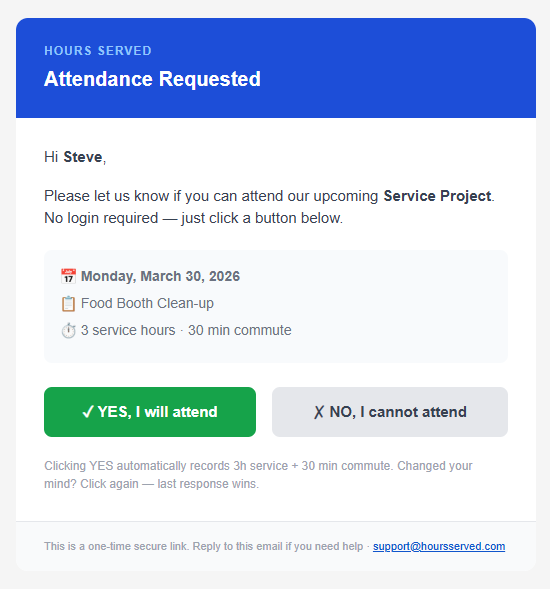
HS-01 · Attendance Requested

Attendance Requested

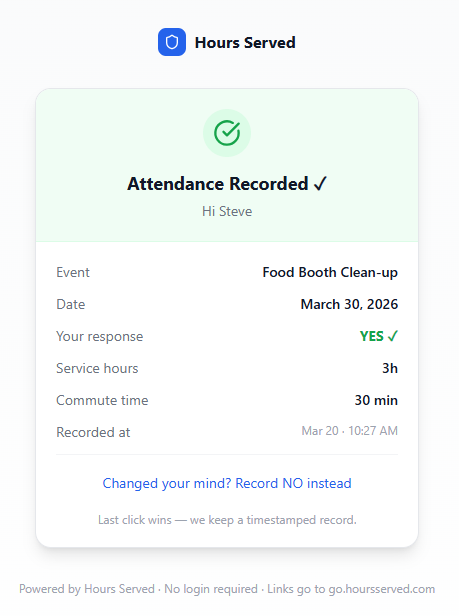
HS-02 · Attendance Confirmed

Attendance Confirmed

Frequently asked questions

What's the key difference between HoursServed and Track It Forward?

Track It Forward lets volunteers log their own hours from a portal. HoursServed logs hours automatically when a member confirms attendance via email — no separate action required.

Do my members need to log in to use HoursServed?

No. Members receive an Attendance Request email and click YES or NO. Hours are captured automatically. There's no portal, no login, no separate step.

Does HoursServed support complex event types beyond recurring meetings?

Yes. HoursServed supports multi-day events with shift management, role-based signups, and per-day scheduling — plus manual member adjustments so secretaries can keep records accurate when actual attendance differs from RSVPs.

Does HoursServed handle dues and payments?

Yes. HoursServed includes dues requests, payment tracking per member, and Interac e-Transfer support for Canadian clubs — something Track It Forward doesn't offer.

What if my volunteers prefer to log their own hours?

If self-logging is important to your organization, Track It Forward may be the better fit. HoursServed assumes officers create events and members confirm — not the other way around.

See HoursServed in action

20 minutes. We'll show you exactly how it works for your organization.