No passwords. No logins. Members just tap a link.

The All-in-One App
Built for Service Clubs

Meetings. Events. Service Hours. Interclub Payments —
organized, automated, and running in minutes.

Also built for churches, community groups & parent organizations

Top 3 HoursServed benefits

Three workflows that give officers more time to serve

01

One-click attendance notification — no login required

Send attendance requests by email and let members respond Yes or No from any device without downloading an app or remembering a password.

  • Notify the full roster in seconds
  • Record attendance and service hours from one response
  • Keep a timestamped officer-ready record
02

Meetings and events drafted with Google Calendar download and sync

Import upcoming Google Calendar events into HoursServed as drafts, review them before activation, and give attendees a one-click Add to Google Calendar option.

  • Import upcoming Google Calendar events as drafts
  • Review duration and commute time before activation
  • Let members add confirmed events to Google Calendar
03

Automated Lion Portal uploads (available with LCI approval)

Automated Lion Portal uploads are coming soon, subject to written approval from Lions Clubs International

  • Capture Lion Portal-aligned fields during normal event entry
  • Route monthly activity reports for officer review and approval
  • Download CSV and PDF reports now; activate protected uploads only after approval
Built forLions clubs worldwide·District Governors & Zone Chairs

The Member Experience

No uncertainty. No friction. Just two buttons.

See the exact workflow — from the email they receive to the moment attendance is recorded.

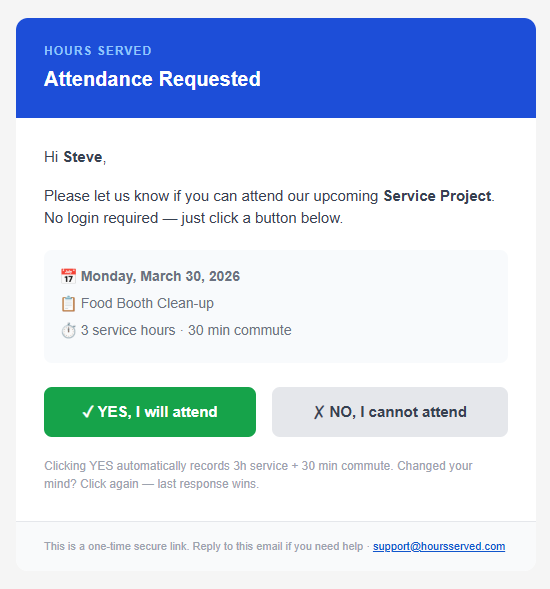
The email they receive
Attendance Requested email — one email, two buttons, no login required

One email. Event details, service hours, commute time — and two buttons. That's the entire interface.

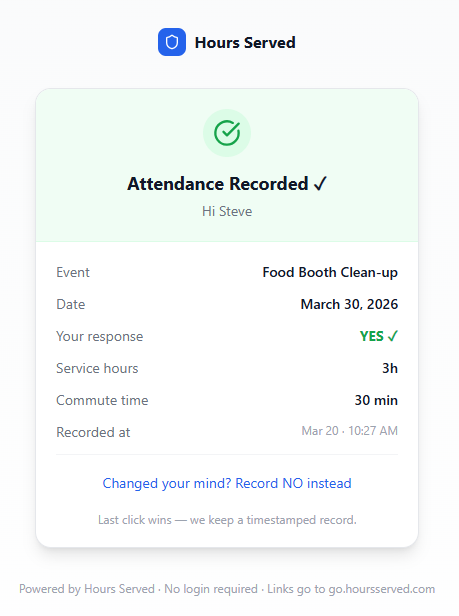
After they click YES
Attendance Recorded confirmation — hours logged automatically, no login required

Attendance recorded. Hours logged. A clean confirmation — and a way to change their mind. Last click wins.

No app download. No account creation. No confusion. Members follow a secure one-time link in the email — every response is timestamped, attributed, and immediately visible in your officer dashboard.

Everything you need

One system. Every admin task handled.

From RSVP to final report — no spreadsheets, no chasing, no chaos.

Meeting sign-ups that run themselves

One email goes out. Members tap Yes or No. Attendance is recorded automatically — no login required, no manual tallying, no phone calls.

Automated nudges go out to non-responders so nothing falls through the cracks before meeting night.

Single-email RSVP — two taps, done
Automatic attendance recording on confirm
Nudge emails for non-responders
Google Calendar sync for members
Month-lock prevents late edits after reporting
May Meeting — RSVP14 attending
Margaret T.Attending
David K.Attending
Sandra L.Regrets
Bob M.Nudge sent
Carol P.Attending
Attendance auto-recorded on confirmation

What's included

Every tool your officers need. None of the bloat they don't.

Core

One-Email RSVP

Members click Yes or No. No login. No portal. Attendance recorded the moment they respond. That's the whole flow.

Events

Shift Management & Signup

Define your event shifts, set capacity, and email the invite. Volunteers claim their slot in one tap. The Event Operations Board shows your coverage live.

Hours

Auto-Logged Service Hours

Every confirmed RSVP and shift signup logs hours automatically. Officers can correct or add hours after the event — even for members who forgot to sign up in advance.

Members

Member & Volunteer Roster

Import your member list, manage active rosters, and track community volunteers separately. Every member gets their own personal dashboard view.

Payments

Interclub Payment Coordination

Send dues requests, track acknowledgments, and keep a clean audit trail for joint events and shared costs — without touching anyone's money.

Reporting

Monthly Reports & Approval Flow

Reports auto-generate at month-end and wait for officer approval before distribution. Or run fully automated — your choice.

District

District Dashboard & Coverage

District governors and Zone Chairs see all club reporting progress in one view. Spot gaps before month-end. Club Detail pages for drill-down.

Lions

LCI Lion Portal Export

Generate a perfectly formatted Lions Clubs International CSV in one click — ready to paste directly into Lion Portal with zero reformatting required.

Intelligence

At-Risk Member Alerts

HoursServed flags members who haven't attended in multiple months so your retention coordinator can reach out before they slip away quietly.

Post-Event Flexibility

Hours corrections, handled gracefully.

Real clubs are messy. Members show up who didn't RSVP. Volunteers log extra time. Someone's signup didn't go through. HoursServed handles all of it — after the fact, without touching the clean data.

1

Event closes — hours auto-logged

Everyone who confirmed attendance has their hours recorded automatically at event end.

2

Corrections Queue opens

Officers see members with zero hours, partial credits, or flagged discrepancies — and can correct them individually.

3

Each change is attributed and dated

Every manual edit shows who changed it and when — a full audit trail for your records.

4

Month-lock protects approved data

Once a month is locked after reporting, no changes can be made without an officer override — protecting your submitted numbers.

Corrections Queue — April
Members needing review
Carol G.Attended Food Bank — 0 hrs loggedPending
Mike T.No RSVP — showed up at eventPending
Anne W.+2 hrs added — setup crewApproved
Dan F.Corrected: 4 hrs → 6 hrsApproved
Month-Lock Active — March
Report submitted. Edits require officer override.

District Tools

Built for governors. Not just secretaries.

Zone Chairs and District Governors get a dedicated view across all clubs — not just their own.

District Dashboard

All clubs in your district. Attendance, hours, and reporting status at a glance — without calling secretaries.

Club Reporting Coverage

See which clubs are up to date, which are lagging, and which haven't filed — before the deadline lands.

Club Detail Pages

Drill into any club for member-level reporting, event history, and hours breakdowns. No access request needed.

Export Center

Download CSV or PDF exports across any date range — formatted for LCI portal submission or your own records.

District 18-C — Club ReportingApril
Westside Lions
100%
Northview Lions
87%
Eastpark Lions
60%
Lakeview Lions
22%
Riverside Lions
95%
Lakeview Lions — low reporting coverage. Follow up?

Is this right for your club?

Choose HoursServed if…

Your admin overhead is too high

  • Your secretary spends hours chasing RSVP replies every month
  • You're manually copying attendance into a spreadsheet after every meeting
  • Your service hours are compiled at month-end from paper sign-in sheets
  • It takes half a day to produce and distribute the monthly report
  • LCI portal submission requires reformatting data from multiple places

Your members are older or not tech-savvy

  • Your members won't create accounts or remember passwords
  • Tap-to-respond email is the only system they'll actually use
  • Adoption has failed before because the tool was too complicated
  • You need something a new secretary can learn in minutes, not hours
  • Members should never need to "figure out" how to participate

You run events with external volunteers

  • Community volunteers join your events who aren't club members
  • You need shift coverage but don't want a complex signup system
  • You need to track volunteer hours separately from member service hours
  • Shift gaps are a recurring problem on event day
  • You want an operations board so the team knows coverage at a glance

You share costs across clubs

  • You co-host events with other clubs and split venue or catering costs
  • Tracking who owes what is currently done by email threads
  • You want a record of interclub cost-sharing without a finance platform
  • Your treasurer needs clean documentation at year end
  • Payment coordination is administrative, not transactional — no money through the app

You're a District Governor or Zone Chair

  • You oversee multiple clubs and have no visibility into their reporting
  • Chasing clubs for monthly updates takes significant time each cycle
  • You want to see member engagement health across clubs
  • LCI reporting requires data from clubs you don't directly manage
  • At-Risk club alerts would help you intervene before clubs decline

You're facing officer transition

  • A new secretary is taking over and institutional knowledge is at risk
  • Your outgoing officers are the only ones who know where the data lives
  • You want the handover to be a data transfer, not a knowledge download
  • The new officer needs to be productive before they're fully trained
  • You want admin continuity — not a fresh start every June

Built for Service Clubs and Districts

United Kingdom

Multiple District 105

Serving Lions clubs across the UK. GBP billing, Lion Portal reporting, and the same no-login member experience your secretary needs.

Australia

Multiple District 201

Supporting Lions clubs across Australia — one of the largest Lions structures in the world. AUD billing, Lion Portal-ready downloadable reporting, and no-login RSVPs that actually get responses.

Your officers have enough to do.
Let the admin run itself.

Start free. No credit card. Set up in minutes and see why clubs across Canada, the US, UK, and Australia chose HoursServed over spreadsheets and patchwork tools.